Introduction to Car Parking Finder App Development
Imagine that you are ten minutes from a meeting, you reach the building, and every parking spot is taken. So, you circle the block. Then you circle it again.
That small moment adds up. According to INRIX research, American drivers spend about 17 hours a year searching for parking, costing around $345 per driver in lost time and fuel. In New York, the figure skyrockets to 107 hours.
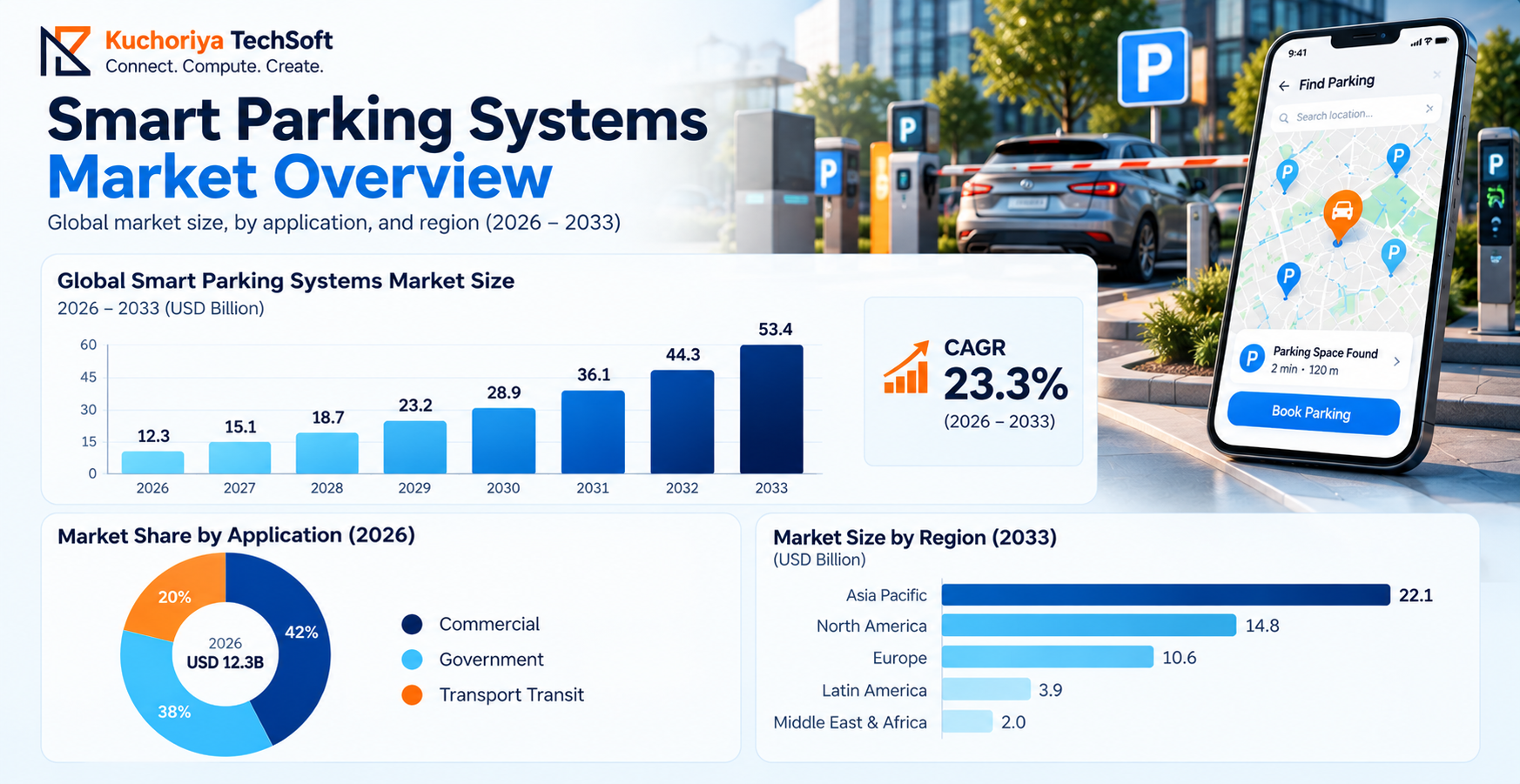
This is precisely where car parking finder app development comes into play. A well-designed app shows real-time parking availability, guides you right to the spot, and even handles payment before you’ve turned off the engine. Businesses are paying attention too. Grand View Research values the smart parking systems market at USD 12.3 billion in 2026, and it’s projected to soar to USD 53.4 billion by 2033 as cities and operators embrace digital parking solutions. (Source)
Having developed parking apps like ParkWhiz and ParkHound, we’re sharing insights from our real project experience. In this guide, we’ll dive into how these apps function, the key features you should look for, the technology that powers them, and what it takes to build one.
What Is a Car Parking Finder App, and How Does It Work?
A car parking finder app is used by people to find out where to park for free near where they currently are. Simply enter a destination, and the car parking finder app shows garages, lots, and street parking options, plus the prices and how many spaces are free.
Many car parking finder apps also allow you to reserve a parking bay before you leave to ensure that you can find a parking spot.
How Does a Parking Finder App Work?
Here is the usual trip, start to finish:
- Open the app and share your location or type a destination
- See nearby spots with live prices and open bays
- Pick one, book it, and pay inside the app
- Follow GPS-based parking navigation to the entrance
What Happens Behind the Screen
Thanks to sensors, cameras, or the operator's own system, it keeps track of which bays are occupied. With regular updates on parking occupancy monitoring, you won’t end up at a lot that was full ten minutes ago.
A top-notch parking finder mobile app makes the entire process, from searching for a spot to completing your payment, take less than a minute.
Types of Car Parking Finder Apps
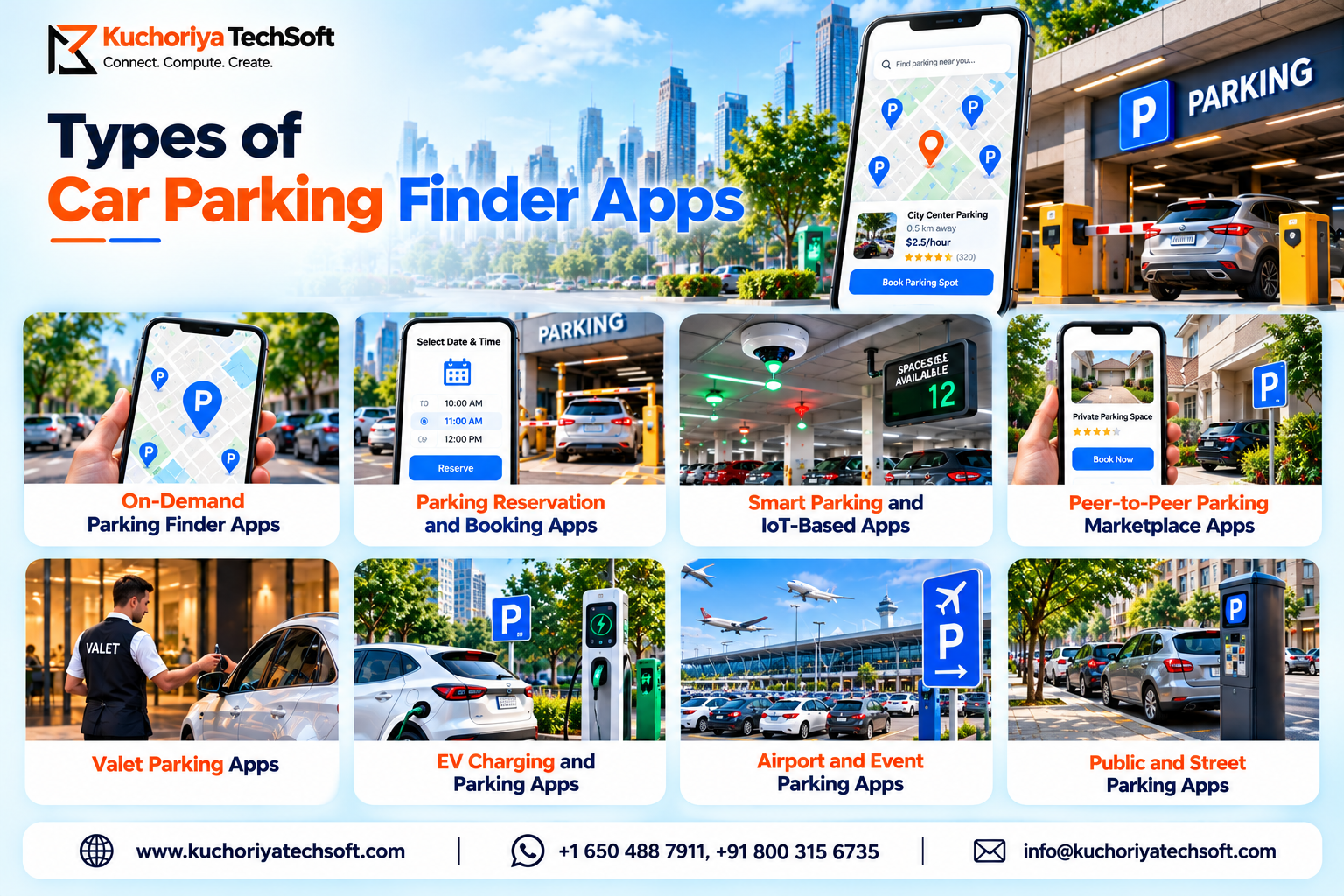
The parking apps are not so universal. As of now, there are the following types of parking finder apps being built by developers, each catering to a specific audience and offering a certain set of tools. These tools can be generally divided into eight categories:
1. On-Demand Parking Finder Apps: These are the simplest of them all; they just inform users of the vacant places nearby and their prices. In parking locator app development, data freshness is prioritized over a beautiful UI.
2. Parking Reservation and Booking Apps: Such parking finder apps allow users to reserve a place in advance, like any travel service for airports. Parking reservation app development, in turn, involves intricate algorithms about refunds and no-show policies rather than the actual booking process.
3. Smart Parking and IoT-Based Apps: This is the most sophisticated level, where smart parking technology solutions are used; motion sensors are installed at parking bays, and the availability of each is constantly updated via the backend. Such parking finder apps are typically developed for large hospitals, malls, and other big-area businesses that would have a hard time updating the vacancy information manually.
4. Peer-to-Peer Parking Marketplace Apps: JustPark is a well-known example of such a parking finder app, where private driveway owners rent their driveways out weekly. Naturally, the parking marketplace business model involves creating a profitable business model around the owners and renters.
5. Valet Parking Apps: Another type of parking finder app, where personal parking attendants will take care of the cars at hotels or other businesses.
6. EV Charging and Parking Apps: Similar to EV charging app solutions, finding a spot to park with a charging station is something all electric vehicle owners are capable of.
7. Airport and Event Parking Apps: Such apps are usually developed for specific businesses around highly populated days, such as football matches.
8. Public and Street Parking Apps: Developed by local governments; such parking finder app examples include on-street parking management systems and car club permit systems. Most of the startups that eventually become big companies begin their development as one of the above-mentioned. Some of them, like Streetcar, eventually evolve from a parking search and booking platform into a full-fledged smart parking tech company.
Key Benefits of Parking Finder Apps for Drivers and Businesses
Time saved for drivers and increased utilization of berths that would otherwise have gone unused benefit owners.
For Drivers
- A parking space finder app tells you a lot is full before you drive there
- The price is on the screen, so the exit gate holds no surprises
- Pay on the phone, skip the ticket machine
- Fewer laps around the block when it’s raining
For Businesses
- Better parking space utilization, because quiet afternoons stop being dead time
- Monthly passes and pre-bookings bring steady income
- An intelligent parking management system shows which zone earns the most and which one barely gets used
- One less person at the booth
Many operators begin their journey with a parking management app development app that allows them to store and manage rates, personnel shifts, and reports in a single place. The next logical step is to develop an app for drivers that will help them find parking.
Essential Features of a Car Parking Finder App
A parking app is a triple win for those looking, those owning, and those managing. These are the parking finder app features that each of these parties needs, along with more advanced tools that can be introduced later.
Drivers are in a hurry; hence, the clean parking app UI/UX design is prioritized on the user end. The parking space reservation system encompasses advance and instant booking whereas the digital parking payment system handles cards, wallets, and receipts. Malls and airports require enterprise parking management solutions, the success of which mainly relies on the robust admin panel.
Any entity considering a parking booking app development should begin with the basics of the users, owners, drivers, and admins. The advanced options can be integrated through the custom parking app development process as per the identified requirements.
How AI, GPS, and IoT Improve Smart Parking
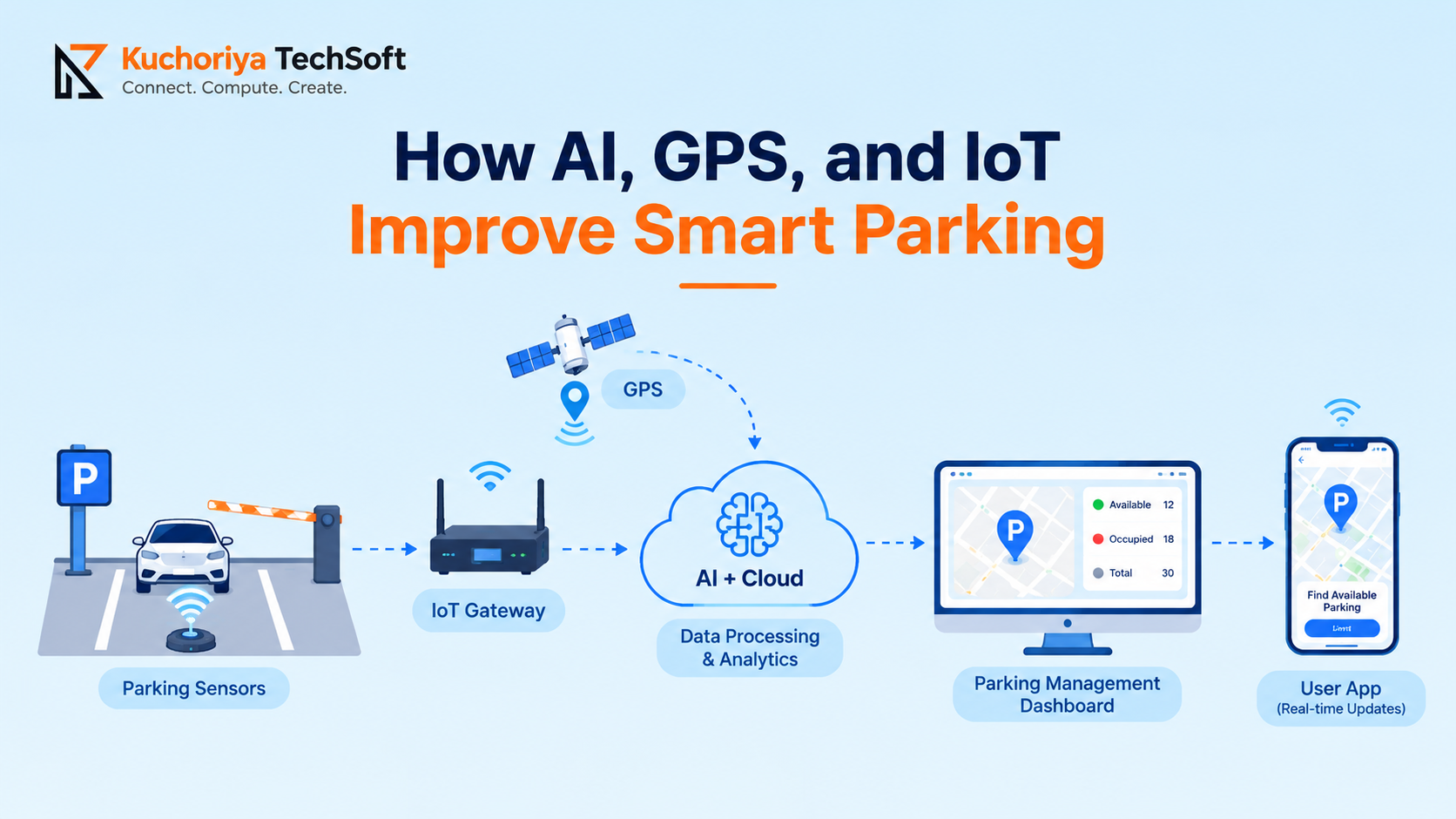
Quick way to see it: sensors are eyes, GPS is a compass, and AI is the brain.
1. IoT Sensors in Smart Parking App Development
A bay is taken or is not, and sensors know before anyone else. Magnetic, ultrasonic, and radar sensors are all possibilities, and cameras take on the task using computer vision.
2. GPS and the AI-Powered Parking Finder App
GPS puts your car and the parking lot on the map, and the trip ends at the right gate, not on the right street. Ask the finder app for the cheapest available covered spot near the airport this evening, and it will tell you by voice or text.
3. AI Parking Space Detection and AI Parking Availability Prediction
Cameras are already watching the parking lot. With the right software they also count the number of available bays. Open lots love this because it's not easy to put a sensor on every space. The same information, combined with weather and match schedules, could tell a driver at 5 pm that there will be space at 6 pm.
4. Machine Learning for Parking Optimization
At noon, some areas are full and some are empty. Recognizing this means setting prices and directing drivers to the best spots.
5. AI-Based Smart Parking Solutions
Cameras read the license plate, so no one has to write it down. Cars that are parked incorrectly are flagged by the system, not by a human.
6. Which Technologies Are Used in Parking App Development?
Founders ask this question constantly. The usual answer points to either Flutter or React Native, and Node.js on the server. Google Maps JavaScript API and MQTT are used as well, but AWS makes the final list of parking app development technologies depend on the size and budget of the project.
Car Parking Finder App Development Process
People come asking how to develop a parking finder app and the first answers are bound to mention some tech. But the first steps in building any app have nothing to do with technology.
Step 1: Watch the Problem Happen
Spend a weekend outside the busy mall or stadium and tally up how long people are circling around, which parking lots get packed by noon, and how many remain half-empty. The car parking app development process goes off the rails at the earliest stage.
Step 2: Ship Less Than You Want To
Search, booking, payment, one city, a few lots. That is what parking app MVP development services should hand you first. Drivers will have second thoughts if you ask for the rest straight away.
Step 3: Keep the Screens Bare
Most drivers are all thumbs and one-handed, and late. Parking mobile application development is much better off being developed on Flutter or React Native because cross-platform parking app development gives you both iPhone and Android from the same codebase.
Step 4: Get the Backend Right
It is the most boring part, but it determines everything. Parking app backend development is where lots, rates, bookings, and the live free-bay count sit. If it lags, the driver sees a wrong number and blames the app.
Step 5: Plan for Things That Break
Maps, payments, SMS, sensors. Each is a separate service. Parking app API integration is mostly about what the app does when one of them goes down.
Step 6: Break It Before Drivers Do
Try a declined card, a weak signal, and a lot that closes mid-booking. Parking app testing and deployment should finish the small beta in lots, and only then the store launch.
Car Parking Finder App Development Cost: Key Factors and Estimates
The development cost of the parking finder app depends on its functionality. A comparable RingGo app costs agencies approximately $35,000 for a basic parking app, and up to $400,000 in 2026, excluding the differences in their scope.
Here is what moves the price:
- Features: map, search, and payment cost less. Live availability and advance booking cost more.
- Hardware: parking sensors and gate systems are often the biggest expense, because each maker uses a different protocol.
- Platforms: iOS, Android, or both. Our ParkWhiz app is on both stores.
- Third-party services: maps, payment gateways, and parking APIs add their own fees.
If you want to test a concept, the find-and-pay app is the usual choice. The 2026 practice report by agencies lists the 14- to 18-week development of such an MVP at around $150,000 to $250,000, while the valet parking MVP is lower, at $20,000 to $50,000. The 2026 agencies differ significantly in the parking app MVP cost, so you may want to compare the estimates feature by feature.
Remember that parking app maintenance and support cost after launch: 15% to 20% of the development cost annually. If you want to outsource the development of the parking app, ask agencies to break down the cost by features.
Parking Finder App Monetization Models
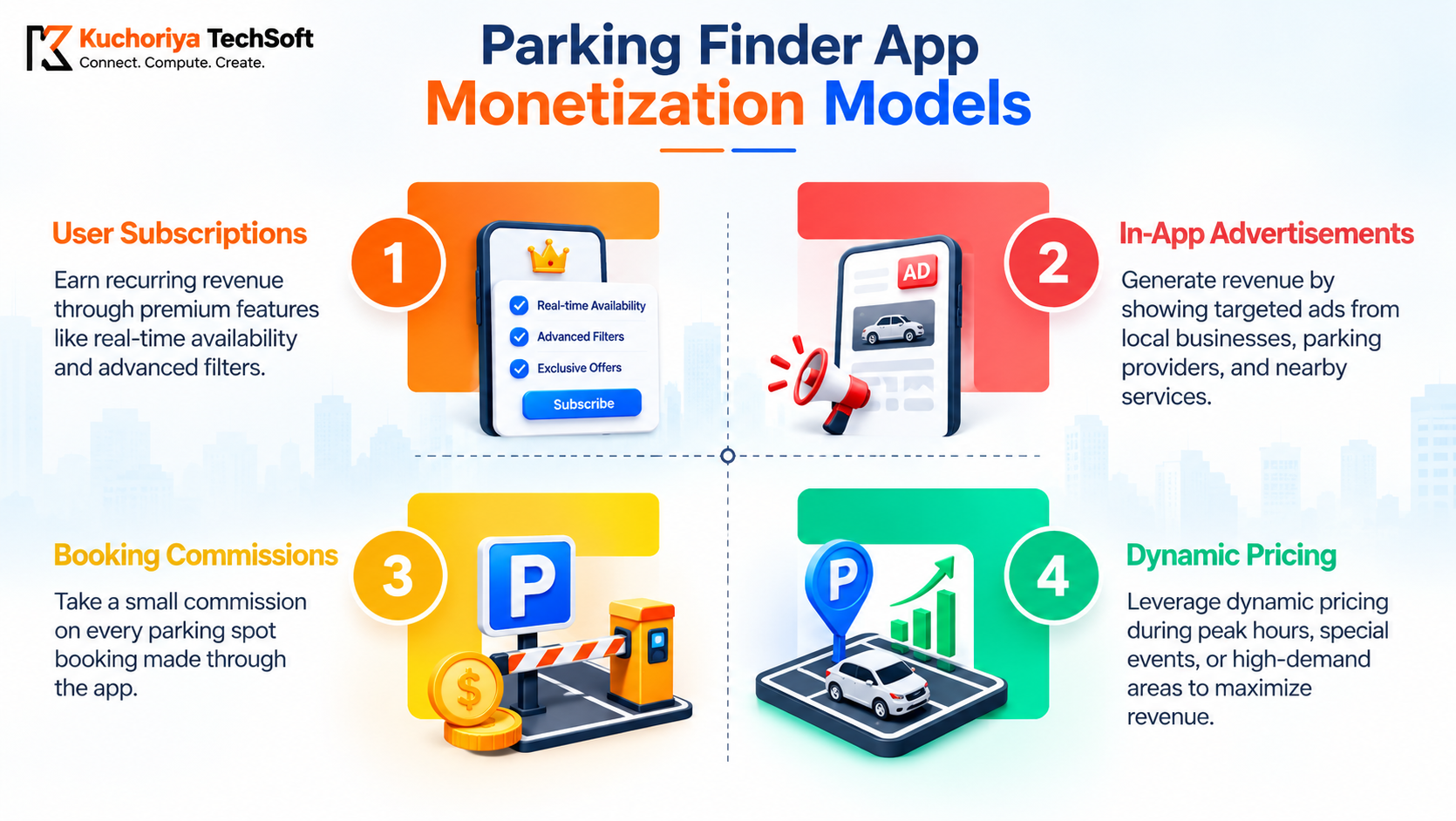
Parking app monetization is a set of methods to make money out of a parking application. Most often, there is more than one revenue stream, as applying several of them together can yield better results. Below are the main ways to monetize a parking app.
Booking Commission
This option implies that the app gets a small commission for each confirmed booking. Usually, it is the first method that a parking reservation application chooses because it is the easiest one.
Subscriptions
This is a recurring payment method; commuters who park their vehicles in the same place frequently can pay extra money to subscribe to a cheaper tariff.
Dynamic Pricing
The tariffs are changed depending on demand; for example, rates can be increased on match days or public holidays and decreased when there are few available cars in a specific region.
Promoted Listings and Ads
It is a great option for garages to promote themselves by paying extra fees to appear on the first page of search results. Car washes and electric vehicle charging station owners can also ask drivers to install their applications while waiting for a parking spot.
White-Label Licensing
Airports, malls, and local governments can join your parking app underneath their branding to make money off the service and decorate the revel in of their clients.
When choosing the proper monetization method, you want to recall who will use your parking app the most. If the app is for drivers, you could make money by way of imparting subscriptions; if it's for lot proprietors, you could monetize the app by means of placing commercials and getting a commission.
Challenges in Parking Finder App Development and How to Address Them
Most parking app development challenges are hidden behind the screen that the driver does not see.
1. Stale availability
A “free” bay that is actually taken away costs the driver’s trust. Automated parking availability monitoring keeps the count fresh, without someone having to update it.
2. Mixed hardware and city systems
Operators have a variety of sensors, gates, and payment terminals, and a July 2026 agency report called that the largest technical risk. Write parking app integration requirements early and build a single flexible API layer.
3. Payments and refunds
Bookings get cancelled, extended, or fail at checkout. Plan for partial refunds and operator payouts from day one.
4. Growth
An app that serves one lot is not ready for a whole city. List the parking app scalability considerations early, and pick a scalable parking app architecture, such as a cloud backend that adds capacity during busy hours.
5. Security and privacy
The app stores the location, vehicle, and payment details, so parking app development must have security built right in. Write parking app security requirements down with your team and cover parking app data privacy and compliance for each region you operate in. A GDPR violation in Europe, for example, can cost 20 million euros in fines or 4% of the company’s turnover.
Why Choose Kuchoriya TechSoft for Car Parking Finder App Development?
Kuchoriya TechSoft has been building software since 2009, and parking is one of the categories we have shipped in. Our parking finder app development services are backed by apps that are already live:
- ParkWhiz (USA): an app where drivers find, book, and pay for parking in advance, with real-time navigation. It is available on both the Play Store and the App Store.
- ParkHound (Australia): an app for finding and booking nearby parking, with real-time availability and secure payments.
Both run on a stack of Java, Kotlin, Swift, React, Node.js, and AWS.
Behind them is a team of 350+ developers, 1,000+ delivered projects across 100+ industries, and ISO 27001 and ISO 9001 certifications. Our 98% client retention rate is something we track closely.
If you need custom parking app development services, you can hire dedicated parking app developers who have already handled live availability, payments, and map data on real projects. Our parking finder app developers work from offices across the USA, Canada, UAE, Australia, Singapore, and India.
Conclusion: Turning a Parking App Idea into a Scalable Solution
A parking finder app earns trust when its data is accurate, payments run smoothly, and operators can manage their own bays. If you plan to develop a custom parking finder app, begin with one core problem and add features in stages. When you are ready, get a parking app development quote split by feature.
Before the start of development, create a custom parking finder app and establish a list of features to be provided by your parking application. Get a parking app development quote to understand your investment and plan your next steps with confidence.
Frequently Asked Questions About Parking Finder App Development
Q. How much does parking finder app development cost?
A. Honestly, it depends on what you stuff into it. A basic MVP with search, a map and simple booking lands around $12,000 to $25,000. Want payments, owner dashboards and an admin panel? Budget $25,000 to $50,000. Sensors, AI and several cities? Higher than that.
Q. What features should a parking finder app have?
A. Live map, real-time availability, slot booking, payments and directions to the lot. That’s the core. Owners need a dashboard for spaces and prices, and admins need reports and user control. EV charging spots? Later.
Q. How do parking apps find available spaces?
A. Smart lots have sensors or cameras that flag a bay once it’s taken. Smaller owners just update their numbers through a dashboard or an API. Your phone’s GPS fills in where you are, and a few apps even guess from old traffic patterns. The map is all of that stitched together.
Q. How can parking apps generate revenue?
A. Commission per booking, mostly. Some apps add a small fee for drivers or sell monthly passes. Owners can pay for premium listings, and busy hours can carry higher prices. Malls and airports sometimes buy the whole thing as white-label software.
Q. How long does parking app development take?
A. A basic MVP? Roughly 3 to 4 months, design and testing included. Payments, dashboards and live availability push it to 5 to 8. Sensors or cameras mean a few extra weeks. And unclear requirements cost more time than any of it.