Imagine paying for a property app your team keeps working around.
It happens a lot. The PropTech market is projected to hit USD 44.59 billion in 2026. Yet T3 Sixty found disconnected tools among brokers’ top frustrations. More software, same headaches. (Source)
Smart real estate app customization fixes this. Your listing rules, lead flow, and reports live in one app. No side spreadsheets needed.
But be careful. The wrong changes make an app harder to run. Read on to see what to change first. Want a plan for your business? Talk to the Kuchoriya TechSoft team.

What Is Real Estate App Customization?
It means changing an app’s screens, rules, and connections to match how your business works. A brokerage can add its own commission split. A rental manager can add a repair request flow. Same app, better fit.
Good real estate software customization starts with one question. Where does your team lose time today?
Property app customization options can be small or big:
- A new agent dashboard
- A custom approval flow
- A link to your CRM
Most teams start with custom real estate app features. Lead routing and role-based views are common picks. Together, they build tailored property software that fits your people.
This is how real estate digital transformation goals become real. Fewer logins. Fewer side spreadsheets.
Why Do Real Estate Businesses Need Flexible App Solutions?
Markets shift fast, and your app has to keep up. Here is why real estate businesses need customizable apps: one fixed setup can’t fit every deal, team, and market.
A 2026 Keyway and The Appraisal survey found 45% of real estate firms are piloting AI. Tools change quickly, so your app should too.
- Flexible real estate app solutions adapt when your team or market changes.
- Why does real estate software need flexible workflows? Because no two deals run the same way.
- Your real estate business workflows change with each deal type.
- Real estate platform flexibility lets you add modules without a rebuild.
- Real estate app personalization gives agents and clients the views they need.
- Benefits of real estate app customization include less rework and fewer workarounds.
- Flexible real estate software for growing businesses adds users and locations easily.
- Property app solutions for property managers handle rent, repairs, and tenant requests together.
Which Parts of a Real Estate App Can Be Customized?
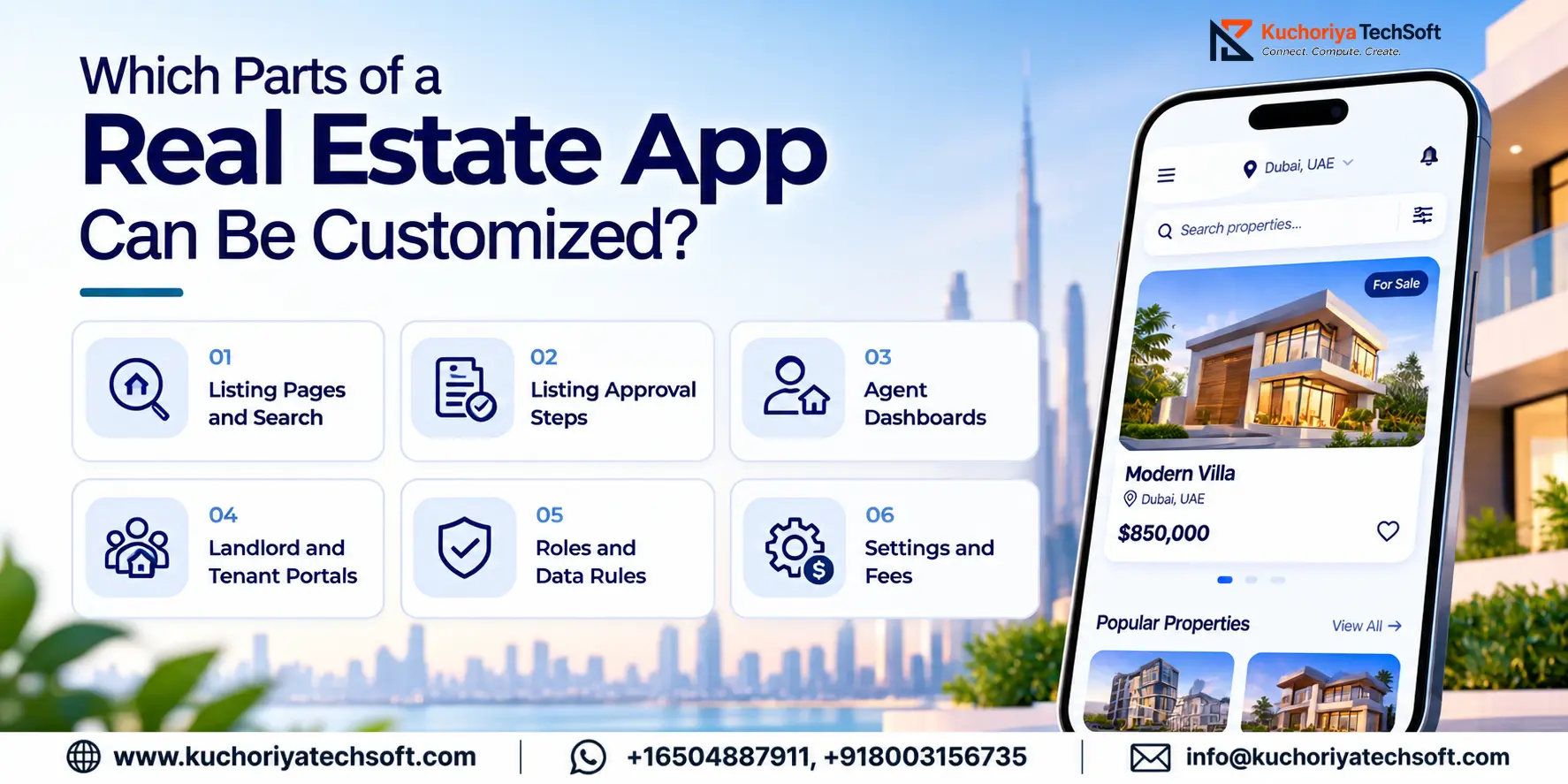
What can be customized in a real estate app? More than most teams expect. Screens, approval steps, user views, even the small settings. Here are six parts worth changing first.
1. Listing Pages and Search
Start with how homes show up. Your property listing platform can use your own photo order and status tags, like “Sold” or “Price Drop.” Flexible features for property platforms, such as saved searches, bring buyers back.
2. Listing Approval Steps
Who signs off before a listing goes live? In many offices, it’s one person and a long email thread. Property listing workflow configuration moves that sign-off inside the app.
3. Agent Dashboards
Agents hate hunting for their own numbers. Agent dashboard customization puts open leads and today’s tasks first, with monthly targets right below. They open the app and know what to do.
4. Landlord and Tenant Portals
A tenant wants to pay rent or report a leaking tap without calling anyone. Landlord and tenant portal customization makes that possible. Your property management app can then track lease dates and send reminders by itself.
5. Roles and Data Rules
Not everyone should see everything. Role-based access for property apps keeps a new agent away from payout records. Good property data management also means clean imports and backups you can actually restore.
6. Settings and Fees
Fees change. Fields get added. Real estate app configuration lets your admin make those edits directly, with no developer ticket.

How Can Custom Workflows Support Different Property Business Models?
Can a property app support different business models? Yes. It needs workflows that an admin can change without a rebuild. A broker and a rental manager both work with property. Their daily tasks are not alike. Real estate app customization for different business models gives each of them the steps they actually use.
The table below shows where the models split.
Real estate workflow customization starts with one real example. Take a sale you closed last month and list every step, even the dull ones like waiting on a signature. Build the app from that list and not from a template. When custom workflows for real estate applications start from a template instead, staff end up doing half the work by hand anyway.
A broker’s day is full of small jobs, and brokerage workflow automation handles a good number of them. New leads go to the agent for that area. A follow-up gets scheduled. And once the deal closes, the commission split is calculated without anyone opening a spreadsheet.
Landlords and rental managers repeat the same jobs every month. Rental management workflow customization turns those jobs into steps the app runs for you. Due dates, late notices, and repair requests sit on one screen instead of three inboxes. With configurable property management workflows, a ten-unit block and a shopping plaza don’t have to follow the same rules.
Plenty of firms do a bit of everything, selling a few homes while managing others. Custom real estate business processes, like monthly owner reports, can run alongside the sales steps. With configurable workflows for property businesses, an admin can change a step directly. No developer ticket is needed.
How Do Integrations Improve Real Estate App Flexibility?
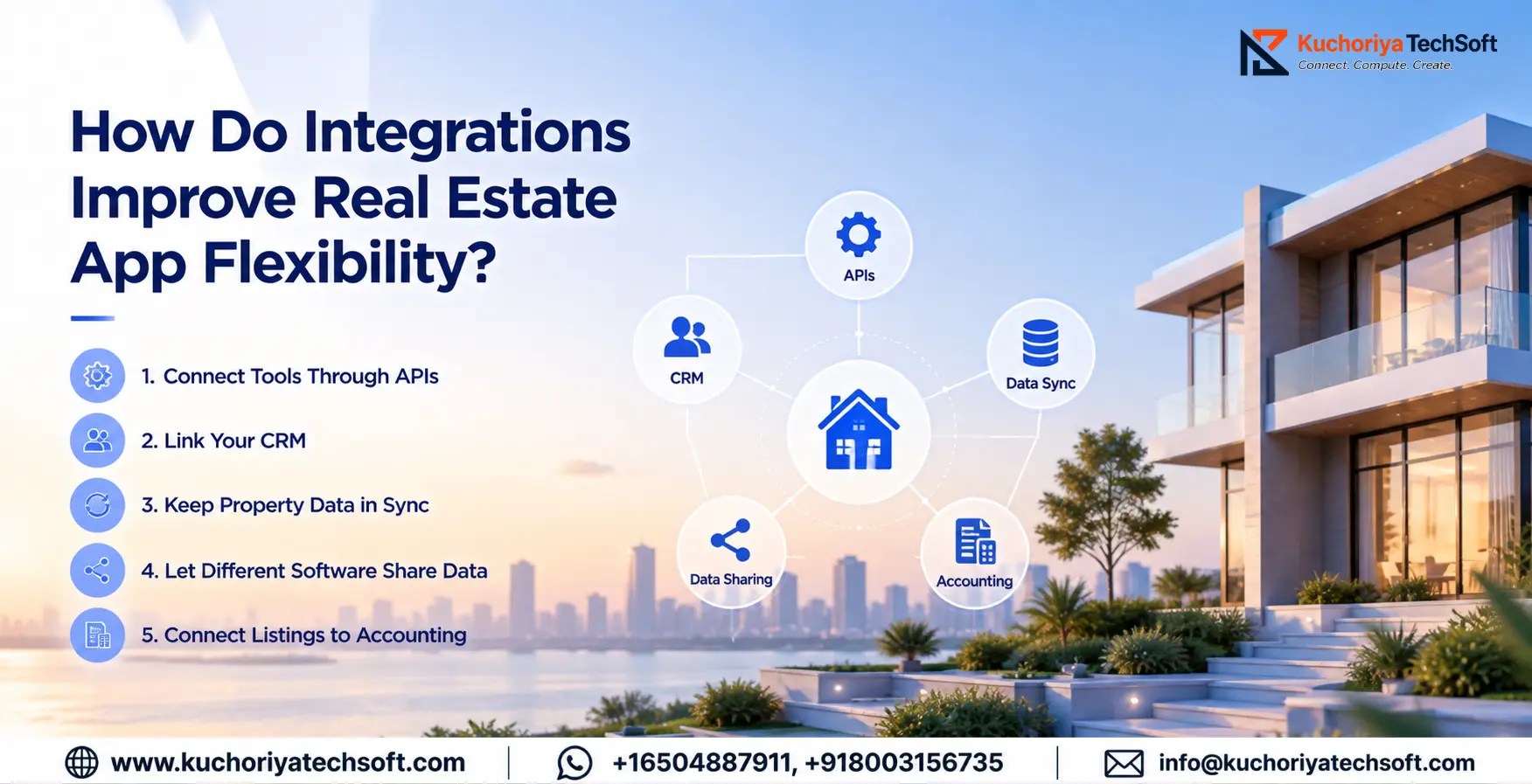
Short answer: they let you change one tool without breaking the rest. Move to a new CRM next year, and only one connection needs work. That is real estate app integration flexibility. The app fits your tools, so you don’t have to bend your tools around the app.
1. Connect Tools Through APIs
API integrations for real estate software are what let your app talk to a payment gateway or an e-signature service. Each one is a separate connection. Remove the payment link and the listings keep running. Teams that follow an API-first approach decide on these connections early, before anyone draws a screen.
2. Link Your CRM
Real estate CRM integration sends a website inquiry to the CRM and the app at the same time. With CRM workflow integration for real estate apps, a lead marked “viewing booked” also creates the task and sends the confirmation. Agents type less and follow up faster.
3. Keep Property Data in Sync
With property data workflow integration, a price change is typed in once. The website picks it up, the app picks it up, and so does the agent dashboard. Nobody has to fix the same listing in three places.
4. Let Different Software Share Data
Real estate software interoperability sounds heavy, but the idea is simple. Your accounting software and your listing tool should be able to read each other’s data. If they can’t, someone ends up copying figures between them.
5. Connect Listings to Accounting
Real estate system integration links what buyers see, like listings, to what your team runs behind the scenes, like contracts and accounts. Add a new tool later, and it plugs in. Nothing old needs patching.
Why Does Modular Architecture Matter for Future Growth?
How do modular features make property apps easier to update? One piece at a time. Edit the rent reminders on a Monday, and the listing search is never touched. Your testers check one module instead of the whole app. If an update goes wrong, only that module needs a fix.
Take four jobs your team does every few months.
Developers call this modular real estate software architecture. Say the payment part gets old. They swap it out, and every other part stays exactly as it was. Configurable software modules for property apps add control on top. An admin can switch a module on or off, or change its settings. A brokerage opening a rental arm can turn on lease tracking without waiting for a new release.
Growth is where this pays off. A scalable property platform architecture takes on more users and more locations without a rebuild. Good real estate software architecture plans for that from day one. It makes software scalability and maintainability easier as well. A bug in the payment module doesn’t mean digging through listing code.
A few ways to make a real estate platform easier to scale:
- Keep payments apart from listings and chat
- Give each module its own settings
- Build new features as new modules, not edits to old ones
- Test a module on its own before release
Industry Insights: Top Features Every Successful Real Estate App Must Have
Custom Real Estate Software vs. Ready-Made Solutions: Which Is More Flexible?
Custom software is the more flexible choice, though it isn’t always the cheaper one. Ready-made tools are fast to set up, and then you work around their limits. Here is how customizable vs. fixed real estate software compares.
Ready-made is a fair pick for a small team with one simple process. Once you start patching gaps with spreadsheets, or you run a brokerage and a rental business side by side, custom starts to make sense.
How Can Businesses Avoid Over-Customization?
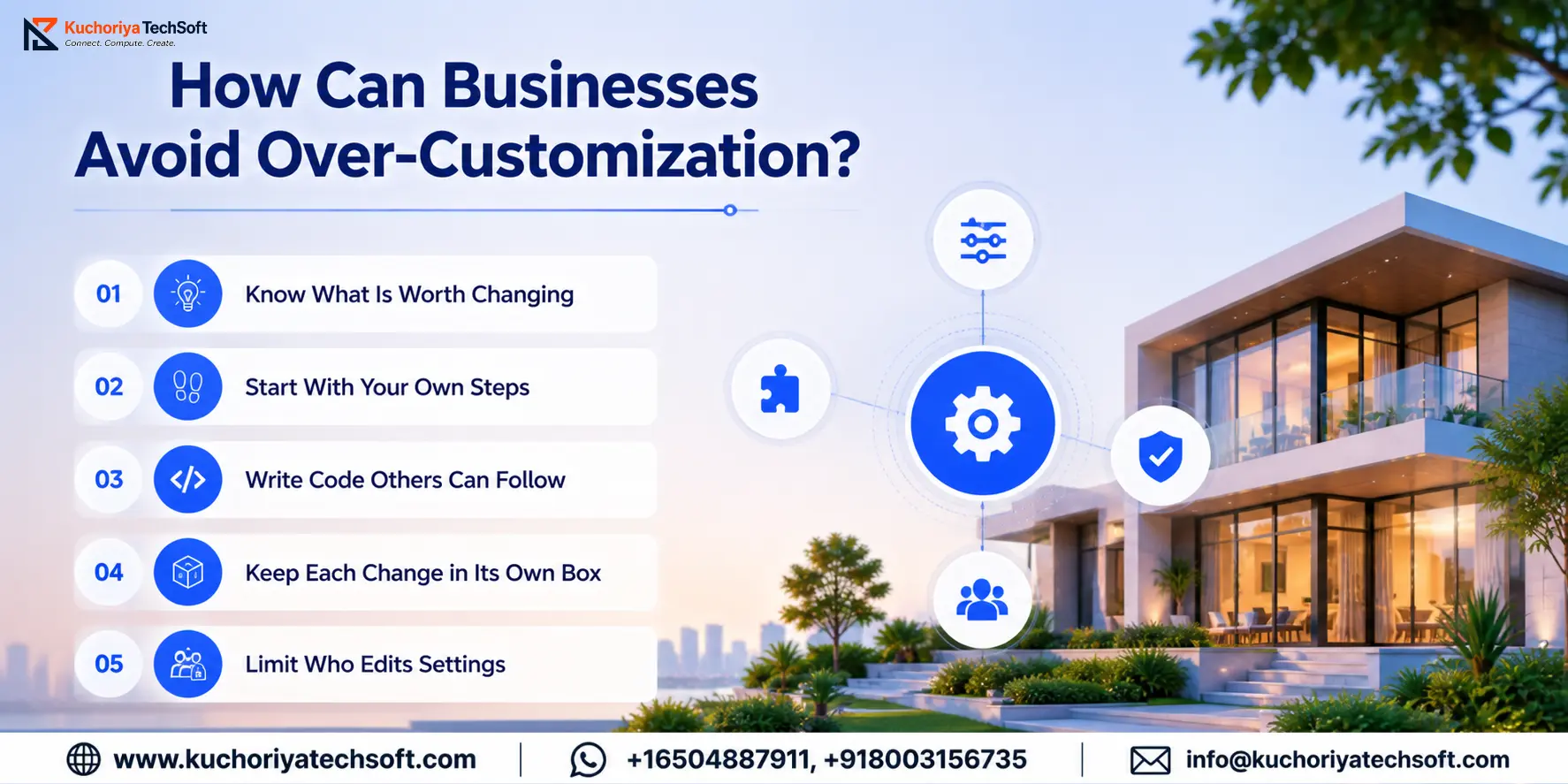
Fix what is actually broken and leave the rest alone. That is the best approach to customizing a real estate app for business needs. If a tweak doesn’t save your team time every week, it is probably clutter. Keep changes small, keep them separate, and let only a few people edit settings.
1. Know What Is Worth Changing
Not every request deserves a developer’s time. Look at a few real estate app customization examples. A commission rule that matches your contracts is worth building. So is a lease reminder that goes out on the right day. A different screen color for each agent is not.
2. Start With Your Own Steps
What does your company do that others don’t? Maybe a late rent notice goes to the owner before the tenant. These business-specific application workflows come first. If a standard feature already works, don’t rebuild it.
3. Write Code Others Can Follow
Someone new will open this app a year from now. Maintainable real estate application architecture is what makes that day easy for them. Use plain names, and add a short note to each custom feature saying why it exists.
4. Keep Each Change in Its Own Box
A custom report that nobody opens still costs you at every app update. With modular architecture, that report lives on its own. Delete it when you’re done and nothing else is affected.
5. Limit Who Edits Settings
Ten admins can mean ten opinions. Role-based access control keeps the settings with a few trusted people. Agents still see their own records, and nothing beyond that.
How to Plan a Real Estate App Customization Roadmap
How to plan real estate app customization: begin by asking your team what eats their day. Put the answers in order of payoff, change two or three things per release, then see what worked before you touch anything else. Done this way, the app grows alongside the business, and you don’t end up with a heap of one-off tweaks.
Rough timings are below. Yours will probably differ.
Use this real estate app customization checklist before each release:
- Does it fix a problem your team named?
- Is it built as a separate module?
- Who owns it after launch?
- Has it been tested with real data?
Conclusion: Building a Flexible Real Estate App for Long-Term Growth
A flexible real estate app comes from a few simple habits. Change what slows your team down, build each change as its own module, connect the tools you already use, and review the roadmap every quarter. Do that, and the app keeps up as your business adds offices, agents, and property types.
Most teams don’t have time to do all this alone. Real estate app customization services help you decide what to change first and what to leave standard. A custom real estate app development company can then build the parts that off-the-shelf tools can’t, like your own commission rules or listing approval steps.
Needs also differ by business. Real estate app customization for brokerages usually starts with lead routing and commission splits. Property app solutions for property managers tend to start with rent reminders, repair requests, and owner reports.
Planning a customization project? Explore Kuchoriya TechSoft Real Estate Solutions, or talk to the Real Estate App Development Company by Kuchoriya TechSoft about what to change first.
Know a brokerage or property manager who needs a custom app? Introduce them through our IT Referral Partner Program.
Talk to Kuchoriya TechSoft today. Visit our website, email our team, or call us to talk through your project.
FAQs About Real Estate App Customization
Q. How can real estate apps adapt to changing business needs?
A. Build it in parts, each with its own settings. New commission tier? Edit a setting. New CRM? Swap one connector. The rest of the app keeps running.
Q. What should businesses customize first in a real estate app?
A. Pick the thing your agents grumble about most. Usually that means rent chasing, listing approvals, or slow lead follow-up. Sort that out, watch it for a month, and only then move on.
Q. Is customizable property software better than fixed software?
A. For a growing team, yes, though not for everybody. Fixed software is running in days. The catch shows up around month six, when you’re bending your process to fit the tool. Customizable software costs more at the start and spares you that.
Q. Quick one: how can a real estate platform scale without rebuilding?
A. Think about growth early, while changes are still cheap. That means separate modules, tidy links to your other tools, and settings an admin can edit. A second office then becomes one more module, not a six-month rebuild.
Q. When to customize real estate software?
A. When you catch people keeping their own spreadsheets or typing the same data twice. The tool is telling you it doesn’t fit. Not sure where to begin? Our team at Kuchoriya TechSoft can review your setup and name the first fix.
Q. What does real estate app customization for brokerages and property managers include?
A. Brokerages usually want lead routing, deal stages, and commission splits. Property managers want rent reminders, repair requests, and owner reports. We at Kuchoriya TechSoft can build either, or both in one app, around how your team already works.